Dashboard
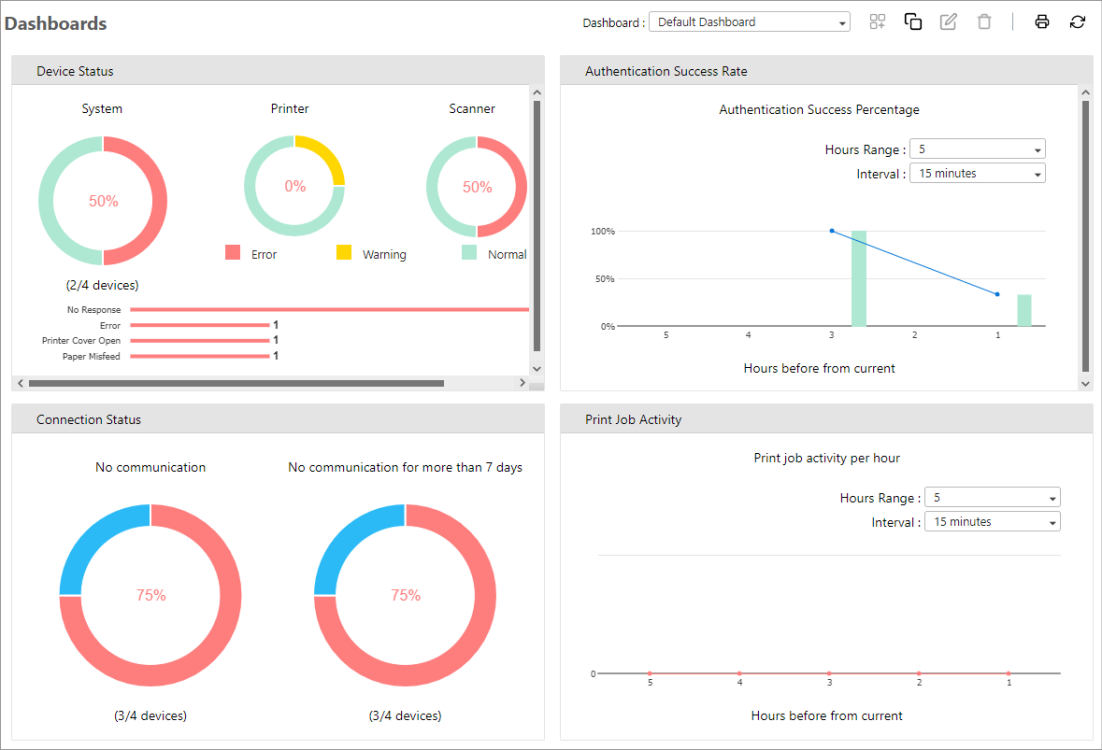
The Dashboards section focuses on displaying actionable items which require your immediate attention. The dashboard uses real-time data and displays it graphically and interactively to manage and monitor your fleet of devices.
Here is a list of functions you can explore to maximize the use of the Dashboards feature.
| Create Dashboard |
| Rename Dashboard and Delete Dashboard. |
| Print Dashboard. |
| Understanding Device Status. |
| Understanding Authentication Success Rate. |
| Understanding Connection Status. |
| Understanding Print Job Activity. |
| Understanding Scan Job Activity. |
| Understanding Device Policy Compliance. |
A dashboard is displayed like the image below. By default, the dashboard is empty. Add a device to populate the data in the dashboard.