Scan Job Activity
The Scan Job Activity dashboard shows the scan job activity of the devices per hour. The column chart shows the scan job activity with an interval grouped by the set hours range.
To use this dashboard you must have a RICOH CloudStream Print&Scan license.
An example below is how a Scan Job Activity is displayed in the dashboard.
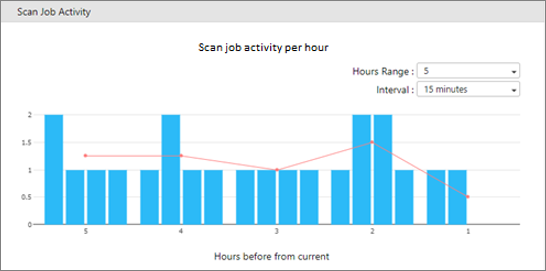
 The line graph represents the average scan job activity per hour, while the column graph represents the activity per interval.
|
Item |
Description |
|---|---|
|
Hours Range |
Select past hours to show from now. Options are 5 hours, 10 hours, 15 hours. Default is 5 hours. |
|
Interval |
Select interval to group in minutes. Options are 10 minutes, 15 minutes, 20 minutes, 30 minutes. Default is 15 minutes. |
Click a part of the graph, and it will open the Scan Job Activity window.
