CloudStream DM Main Features
The RICOH CloudStream Device Management (DM) portal allows you to manage multiple devices, configure system settings, and manage users and administrators, all of that in one simple application.
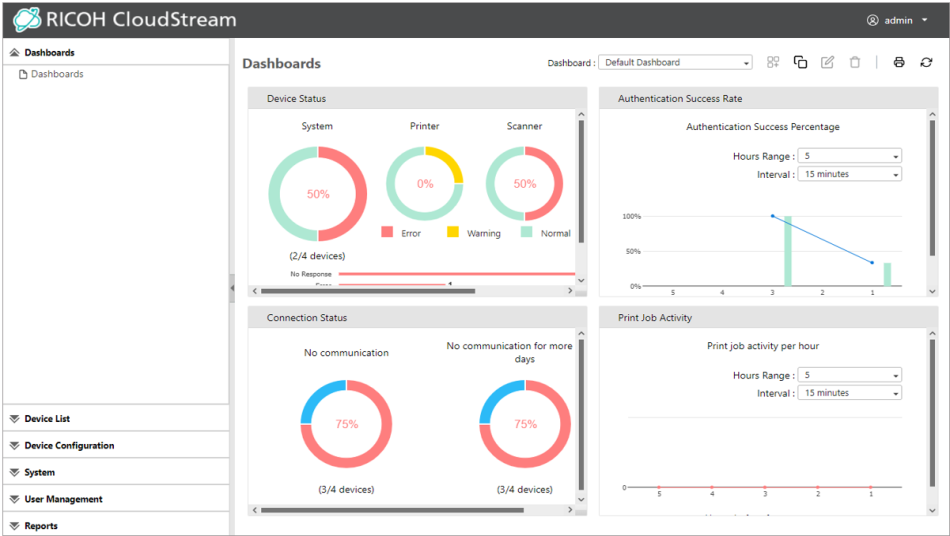
The table below gives a summary of each main menu of CloudStream DM.
|
Area |
Description |
|---|---|
|
Dashboard |
This section focuses on displaying actionable items which require your immediate attention. The dashboard uses real-time data and displays it graphically and interactively to manage and monitor your fleet of devices. Read more about this in Dashboard. |
|
Device List |
This is where all your devices are listed. You can also see the device's information from this menu. Read more about this in Managing Devices. |
|
Device Configuration |
This section contains features that allow you to configure printer settings. You can also deploy printer firmware, embedded applications, and device policies. Read more about this in Device Configuration. |
|
System |
This section contains the features that allow you to configure email server, activate licenses, view certificates, create alert policies and more. Read more about this in System Settings. |
|
User Management |
This section helps you monitor registered end-users properties, including card creation and PIN settings. Read more about this in User Management . |
|
Reports |
Generate reports and create scheduled report tasks in this section. Read more about this in Reports. |
