DM Agent Update and Install
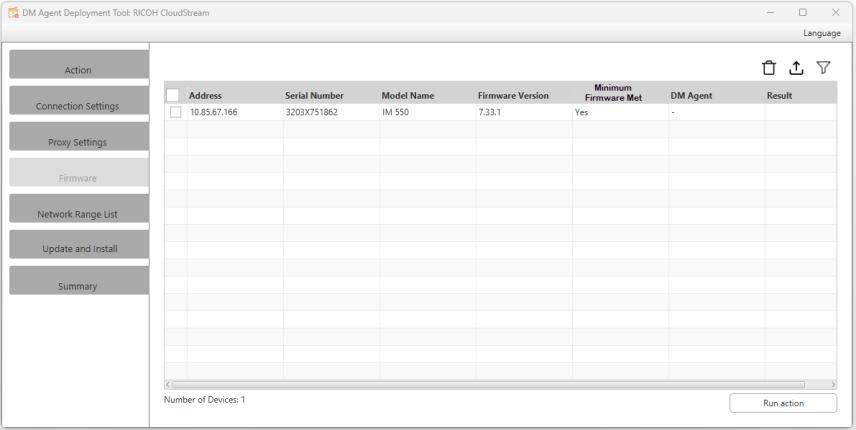
All available devices are displayed on the list grid with their device information. You can delete  the devices from the list or export
  them to a CSV file.
|
Column Header |
Description |
|---|---|
|
Address |
The devices IP address or hostname. |
|
Serial Number |
The serial number of the device. |
|
Model Name |
The device model name. |
|
Firmware Version |
If the device allows the tool to read its firmware information, it will be displayed here, else, it will display "Unknown". |
|
Minimum Firmware Met |
This column will display three possible values.
|
|
DM Agent |
Displays the DM Agent version if installed and "-" if not installed. |
|
Result |
Initially this column is empty. After clicking the [Run Action] button, the result is shown after the process.
The Firmware Version column, Firmware Status column, and DM Agent columns are also updated accordingly after clicking [Run Action]. |
Run Action
Click the [Run Action] button to execute the action selected.
|
Action |
Result |
|---|---|
|
Install DM Agent |
The tool will install a DM Agent application to the devices in the list. If RICOH CloudStream Device Management license is insufficient, the installation will still proceed, and devices will still be registered but shall display "blank" or as unmanaged device in CloudStream DM application. After running the operation, the Result and DM Agent columns are updated based on the result of the installation. If the DM Agent is successfully installed, the following will be displayed.
Optionally, you can check the DM Agent Summary screen to see the logs. |
|
Uninstall DM Agent |
The application will be uninstalled from the device. If the device does not have the DM Agent application installed, it will just skip the process. After running the operation, the Result and DM Agent columns are updated based on the result of the uninstallation. If the DM Agent is successfully uninstalled, the following will be displayed.
Optionally, you can check the DM Agent Summary screen to see the logs. |
|
Firmware Update |
The device's firmware is updated. After running the operation, the Result, Firmware Version, and Firmware Status columns are updated based on the result of the update. If the firmware is successfully updated, the following will be displayed.
Optionally, you can check the DM Agent Summary screen to see the logs. |
 If the result displays fail, please refer to DM Agent Troubleshooting .
