Administrator Accounts
Administrators manage and configure devices, change system settings, manage certificates, and much more. They can also create other administrators with different levels of access or privileges.
There are two types of administrators.
-
Local Administrators - The default 'admin' account is an example of a local administrator. As mentioned, you can create other local administrators and assign them to a role.
-
External Administrators - These types of administrators use an authentication profile to login. Existing admin users from LDAP and OIDC providers can be assigned to a role in RICOH CloudStream Device Management.
Best Practice
Create at least two local administrator accounts, with names that do not have the word admin or administrator in them and disable the default local admin account. These two accounts must be assigned the full admin role. To disable a local admin account, check "Account locked" then click save.
In the event that one account is locked, the other can continue to manage the system and unlock the locked administrator’s account.
Here is the list of roles an administrator can be assigned to.
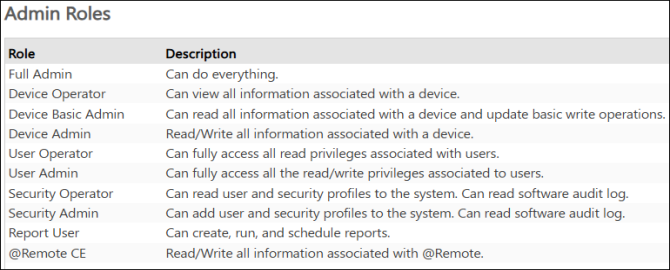
 A local administrator can have multiple roles, while the role of an external administrator is determined by the group the admin belongs to. More Admin Roles information is described in Administrator Roles.
