Alert Policy for Brother Consumables
To generate an email that notifies when relevant consumable supplies for Brother devices are needed, specific settings are required to generate the alert details. It is recommended to create an alert policy for each supply needed to integrate Brother MPS.
 Please set up the Email Server Settings prior to creating account policies.
To create an alert notification, follow the steps below:
-
Login as an administrator.
-
Go to System and click Alert Policies.
-
Click Add.
-
In the General section, enter the Policy Name.
-
For the Triggers, select the criteria that will enable an Error or Warning.
-
For Other supply alerts (such as Drum/Belt/PF kit options), enable the Alert Number checkbox and enter the specific target status number from the table below. For example, for Replace WT Box, enter the status code 99901.
-
To set a Toner alert, enable the Toner Level checkbox, and then click +. A new row appears in the table, and you can click in each column to select the values. In the example below an alert has been created for Black toner when it reaches less than 20%. Remember to click Save in the Toner Level section to save each added toner level warning.
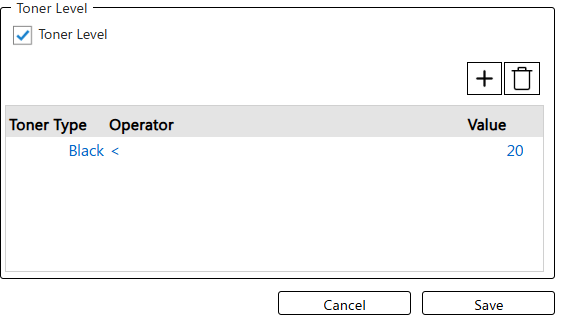 If the toner is not set, the Toner/Ink status before removal is displayed. The Toner Almost Empty is displayed when the remaining amount is less then 10% only.
 -
Set the conditions.
-
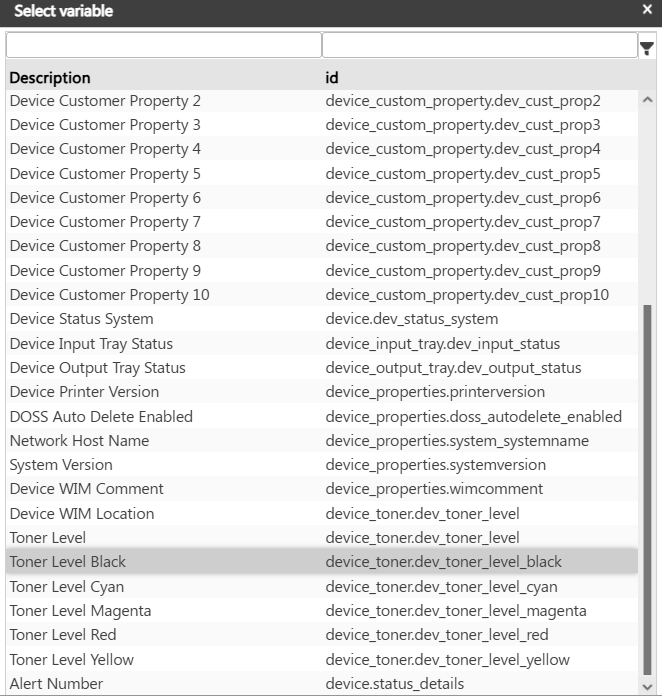
In the Message section, click Add. Select the Language. Click in the Subject field. The field is automatically populated with default information, including variables. Right-click on a default variable to view a list of replacement variables. The list will pop up on top of the screen and you can choose the suitable variable.
-
Enter the Email Address that will receive the message.
-
Modify the body text as needed. The default body uses variables to provide the detected error/warning information that prompted the device state and specific details about the device itself (shown below). You can remove information if it is not relevant.
__________________________________________
The device status has changed. <br>
Detected on: $[device.dev_status_polltime]$<br>
Device Display Name: $[device.displayname]$<br>
System Status: $[device.dev_status_system]$<br>
Printer Status : $[device.dev_status_printer]$<br>
Copy Status: $[device.dev_status_copier]$<br>
Fax Status: $[device.dev_status_fax]$<br>
Scanner Status: $[device.dev_status_scanner]$<br>
IP Address: $[device.dev_ipaddress]$<br>
MAC Address: $[device.dev_mac_address]$
____________________________________________________
-
Click Save.
-
Select the Monitored Devices.
-
Save the alert.
Target Status
|
Target Status Number |
Description |
Subject |
|---|---|---|
| 99901 | Drum End Soon |
Status Notification [Drum End Soon] |
| 99902 | Replace Drum | Status Notification [Replace Drum] |
| 99903 | Belt End Soon |
Status Notification [Belt End Soon] |
| 99904 | Replace Belt |
Status Notification [Replace Belt] |
| 99905 | Replace Fuser |
Status Notification [Replace Fuser] |
| 99906 | Replace Laser |
Status Notification [Replace Laser] |
| 99907 | Replace PF Kit1 |
Status Notification [Replace PF Kit1] |
| 99908 | Replace PF Kit2 |
Status Notification [Replace PF Kit2] |
| 99909 | Replace PF Kit3 |
Status Notification [Replace PF Kit3] |
| 99910 | Replace PF Kit4 |
Status Notification [Replace PF Kit4] |
| 99911 | Replace PF Kit5 |
Status Notification [Replace PF Kit5] |
| 99912 | Replace PF KitMP |
Status Notification [Replace PF KitMP] |
| 99913 | WT Box End Soon |
Status Notification [WT Box End Soon] |
| 99914 | Replace WT Box |
Status Notification [Replace WT Box] |
| Toner Low (C) | Status Notification [Replace Toner (C)] | |
| Toner Low (M) |
Status Notification [Replace Toner (M)] |
|
| Toner Low (Y) |
Status Notification [Replace Toner (Y)] |
|
| Toner Low (BK) |
Status Notification [Replace Toner (BK)] |
|
| Replace Toner (C) |
Status Notification [Replace Toner (C)] |
|
| Replace Toner (M) |
Status Notification [Replace Toner (M)] |
|
| Replace Toner (Y) |
Status Notification [Replace Toner (Y)] |
|
| Replace Toner (BK) |
Status Notification [Replace Toner (BK)] |
