WfH Device Properties
A WfH device will display less device information compared to a DM Agent-managed device.
There are four nodes displayed for a WfH device.
| Main Properties. |
| Status Details. |
| Counters. |
| Work from Home. |
 The WfH device information is obtained via polling. If there are changes in the device's information, the data will be displayed in the next polling cycle.
 Information retrieved from USB-connected WfH devices is limited to the following only:
-
Properties: Manufacturer, Model, Serial Number, Installed Memory, Comment
-
Status Details: System Status, Printer Status
-
Counters: Total, Printer Black, Printer Color Full
The table below lists the device information retrieved from a WfH device.
| WfH Device Properties | |
|---|---|
| Display Name | Device Address |
| Model Name* | Vendor Name |
| Serial Number* | MAC Address |
| Location | Installed Memory* |
|
Comment* |
Manufacturer* |
The Display Name is the WfH Client machine’s “<Hostname>.<DomainName>”, while the Address is WfH Client machine’s “<Hostname>.<DomainName>.WfH".
The USB-connected Work from Home devices only display the properties with an asterisk (*).
Displays the Printer Status and the Toner Level Status only.
For Printer Status, System and Printer information are the only status shown. When more than one status has occurred at the same time, the status with higher priority is displayed.
|
System
|
Printer
|


For Toner Level Status, a list of examples below shows how the remaining toner levels are represented in the Status Details node.
| Example toner status | Explanation |
|---|---|

|
The Black (K) toner cartridge has 80 - 100%. |

|
The Cyan (C) toner cartridge has 60 - 80% remaining. The empty box indicates that a minimum of 20% of the cyan toner has been used. |

|
The Magenta (M) toner cartridge has 40 - 60% remaining. The empty boxes indicate that a minimum of 40% of the magenta toner has been used. |

|
The Yellow (Y) toner cartridge has 20 - 40% remaining. The empty boxes indicate that a minimum of 60% of the yellow toner has been used. |

|
The Black (K) toner cartridge has 0 - 20% remaining. The empty boxes indicate that a minimum of 80% of the black toner has been used. |

|
Running out of toner/ink. |

|
Out of toner/ink. |
 Unknown Unknown |
Remaining toner is unknown. |
|
OK |
The toner level cannot be obtained for the device, but it’s not low or empty. |
The table below lists the counters retrieved from a WfH device.
| Device Counters | |
|---|---|
| Total - Indicates the total value of the counters for the copier, printer, and fax functions. The Total counter provides the sum of all toner usage on this device and is a cumulative total of monochrome and color toner usage (if applicable). |
Printer Black - Indicates the counter values for the printer function. |
| Printer Color Full | Fax Black |
| Fax Color | Copy Black |
| Copy Color Full | Fax Send |
| Duplex | A3/DLT |
| Total Color | Total Mono |
| Scanner Send Color - Indicates the counter value for the scanner send color function. |
Scanner Send Mono - Indicates the counter value for the scanner send B&W function. |
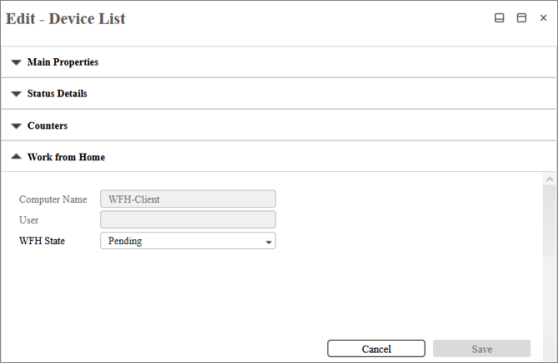
Information about Work from Home node is described below.
| Item | Description |
|---|---|
| Computer Name | Displays the name of the computer where the WfH Client service is running. The name is read-only. |
| User | Displays the user name of the user associated with the device. The user name is read-only. |
| WfH State | Allows you to view and set the state of the device. To know more about the WfH device state, go to Change WfH Device State. |
