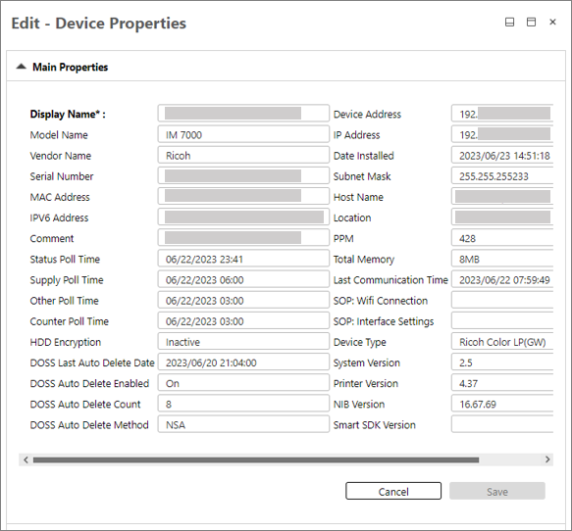
Device Main Properties
Device main properties are displayed in the table below. With the exception of the Display Name, these properties are not editable in this screen because they are read from the device only.
 The information is obtained via polling. If there are changes in a device's information, the data will be updated in the next polling cycle. For non-Ricoh devices, only Main Properties, Status Details, Counters, Access Profiles and History are displayed.
| Device Properties | |
|---|---|
| Display Name - Displays the name of the device in CloudStream DM. You can edit the device's name in CloudStream DM. This setting does not affect the actual device's settings. Please click [Save] after modification. If you change the device name in this screen, you will override the default Device Name setting from Device Display Format. |
Device Address - This is the address used by CloudStream DM to access the device. |
| Model Name | IP Address - Displays the IPv4 address of the device. |
| Vendor Name | Date Installed - Displays the date and time the device was registered to CloudStream DM. - This setting may display empty as CloudStream DM does not support the setting. |
| Serial Number | Subnet Mask |
| MAC Address | Host Name |
| IPv6 Address - Displays the IPv6 address of the device if available. - This setting may display empty as CloudStream DM does not support the setting. |
Location - This setting may display empty as CloudStream DM does not support the setting. |
| Comment - This setting may display empty as CloudStream DM does not support the setting. |
PPM - Displays the number of pages that can be printed per minute. |
| Status Poll Time - Displays the date and time of the last status polling. |
Total Memory |
| Supply Poll Time - Displays the date and time of the last supply polling. |
Last Communication Time |
| Other Poll Time - Displays the date and time of the last other polling. |
SOP: Wifi Connection - This setting may display empty as CloudStream DM does not support the setting. |
| Counter Poll Time - Displays the date and time of the last counter polling. |
SOP: Interface Settings - This setting may display empty as CloudStream DM does not support the setting. |
| HDD Encryption - Displays if HDD encryption is active or inactive |
Device Type - Displays the detailed device type description. |
|
DOSS Last Auto Delete Date - This setting may display empty as CloudStream DM does not support the setting. |
System Version |
| DOSS Auto Delete Enabled | Printer Version |
| DOSS Auto Delete Count | NIB Version |
| DOSS Auto Delete Method | Smart SDK Version |
An example of device a main properties is displayed below: