History
This node shows the Counters History and Status History of the device.
The Counters history table displays the counters retrieved from the device at each polling time.
You can find the following columns in the table.
| Column Headers |
|---|
| Poll Time - The date and time the counters were polled from the device. |
| Copy Full Color |
| Copy Color Mono |
| Copy Color Twin |
| Fax Black |
| Printer Color Full |
| Printer Color Mono |
| Printer Color Twin |
| Total - Indicates the total value of the counters for the copier, printer, and fax functions. |
An example of the Counters history is displayed below.
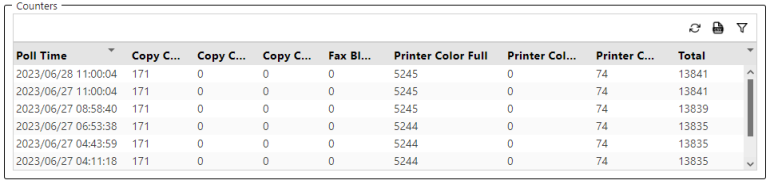
The above example shows that a page is printed in full color at 2023/06/27 8:58:40, making the Printer Color Full counter increase by 1.
 On the top-right corner, you can find the
  export to CSV icon. Clicking this icon will export the contents of the table to a CSV file.
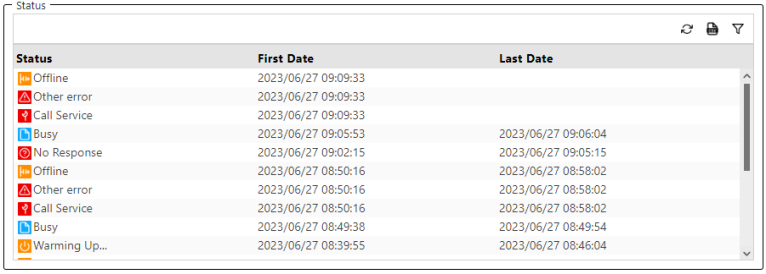
The Status history table displays the states the device has gone through. One entry is shown for each state.
You can find the following columns in the Status history table.
| Column Headers |
|---|
| Status - Displays the state of the device on a specific date and time. An icon with a description is displayed. To know more about different device statuses, go to Status Details. |
| First Date - Displays the date and time the device entered a state described in the Status column. |
| Last Date - Displays the date and time the status ended. The Last Date is displayed when the device enters a different state. If the Last Date is Null or empty, this indicates that the status is still active. |
An example of the Status history is displayed below.
On the top-right corner, you can find the export to CSV icon. Clicking this icon will export the contents of the table to a CSV file.
