Import User Cards
This feature allows you to import a CSV file containing card information.
 If you want to export cards, please refer to Export User Cards.
To import cards, please follow the steps below:
-
Login as an administrator.
-
Go to User Management then click Cards.
-
Click [Import]. A pop-up window will appear.
-
Click [Choose File] and select CSV file with the following format.
Line 1: "card_name","card_number,"user_name","card_enabledflag","card_effectivedate","card_expirydate","update_username","update_timestamp"
Line 2: <the card details following the format in Line 1>
An example is shown below:
"card_name","card_number,"user_name","card_enabledflag","card_effectivedate","card_expirydate","update_username","update_timestamp"
"company card-1","123456789","userA","true","2024-10-20 09:00:00", "2025-10-19 08:00:00","localadminuser","2024-07-01 09:00:00"
"company card-2","223456789","userB","true","", "","localadminuser","2024-07-01 09:00:00"
"company card-3","233456789","","false","", "","localadminuser","2024-07-01 09:00:00"
Where:
Column Header
Description
card_name
The name of the card.
This item is required and should be unique.
card_number
The card number.
This item is required and should be unique.
user_name
The assigned username of the card.
If you plan to assign the card after you imported the CSV, leave this part empty "".
See line 4 in the example above. In this case, the import process will flag the missing username as an error, and you will have an opportunity to select the username from a drop-down list.
card_enabledflag
Identifies if the card is active or not.
-
Set "true", if you want the card to be usable.
-
Set "false", if want to disable the card's usage.
This item is required.
card_effectivedate
The start date to use the card. The date should be in this format:
yyyy-mm-dd hh:mm:ss
where hh is in 24-hour format.
If the card's validity is an indefinite period, leave this part empty "". Indefinite period means the card will not expire.
See line 3 and 4 in the example above.
card_expirydate
The date the card becomes unusable. The date should be in this format:
yyyy-mm-dd hh:mm:ss
where hh is in 24-hour format.
If the card's validity is an indefinite period, leave this part empty "". Indefinite period means the card will not expire.
See line 3 and 4 in the example above.
update_username
The administrator's username who updated the card's information.
This item is required.
update_timestamp
The date and time the administrator updated the card's information.
This item is required.
-
-
Click [Upload].
-
Click [Commit]to proceed.
If you commit a mix of valid and invalid rows, the valid rows will be imported and removed from the screen and invalid rows will remain for additional correction.
The information is read from the csv file and details are validated.
If you upload an empty CSV file that does not include the correct columns, an error message is displayed. Any rows with missing or invalid data are listed in the screen for correction. Specific information that is missing is indicated by a red exclamation mark in the column. Card name and card number must not be empty. If details are missing from these columns, you can correct the information. To select a missing user name, click directly in the field and select the user from the list.
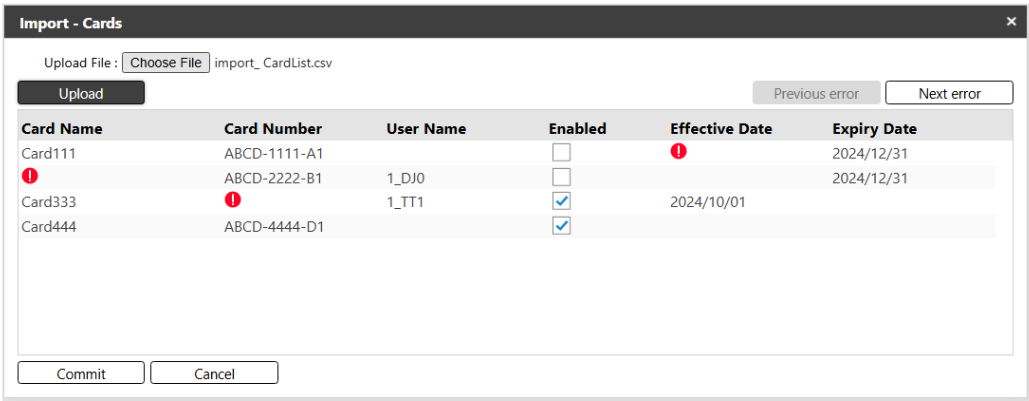
The import will start immediately. If all cards are valid, you will see a message stating "All valid items have been successfully imported" and all imported cards will be displayed.
Troubleshooting Tips
-
If the card number already existed in the list, the card's information will be updated.
-
If the user name that you have provided in the CSV file is not found in the user management, an exclamation mark appears in the user name field to indicate that the user information is not valid. Click on the user name field to select from a list of valid user names.
-
The date fields are not required. Date cells will show a blank when missing in the import file or an exclamation when is included in the import file, but it is in an invalid format. Valid formats are:
-
Date - yyyy-MM-dd – Example: 2024-12-31
-
Date & Time - yyyy-MM-dd hh:mm:ss – Example: 2024-12-31 12:00:00
-
