Add Monitored Devices
The alert policy will cover only the devices listed in this section. You can add multiple devices or groups of devices to be monitored.
To add devices to be monitored, you can use the two buttons below to populate the target devices and groups list.
|
Button |
Function |
|---|---|
|
Add Target Group |
Clicking this button will display the "Target Groups" dialog. The dialog contains the Available Groups pane and the Target Groups pane. The list of Available Groups is based on the Device List groups configuration, whose defaults are Host Name, IP Address, and Models group. The customized groups are also displayed and can be selected as a target group. Like the Template step, move the device groups from Available Groups to the Target Groups pane by clicking the
|
|
Add Target Device |
Clicking this button will display the "Select Target Devices" pop-up dialog. The dialog contains the Available Devices pane and the Target Devices pane. Like the Template step, use the
Filter Devices For easier selection, use the filter to search for the devices you want to add to the Target Devices pane.
You can also perform filtering from the Available Devices pane.
|
 button.
  If you want to select all devices, you can check the All Devices box. Checking this box will add all the devices and or groups to the target devices/groups.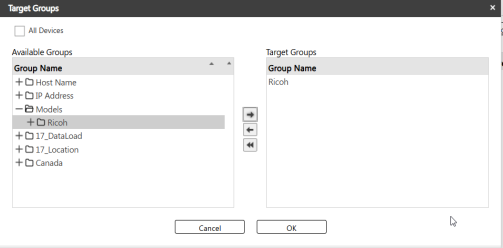
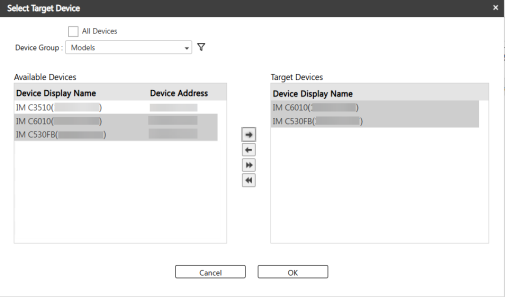
 icon and enter the display name or the device's IP address into its corresponding column.
  icon, or just press enter from your keyboard.
