Total Document Usage Reports
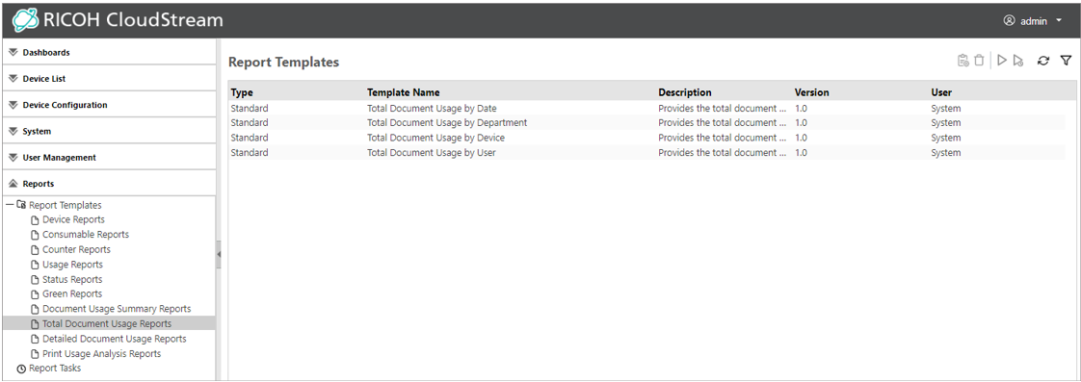
Use a report template in the Total Document Usage Reports category to create a report with the total document usage (number of printed or sent pages per job type).
|
Total Document Usage Report Templates |
Description |
|---|---|
|
Total Document Usage by Date |
Use this report to view the total document usage for the specified period. Dates with no output are not shown. The output ratio of the job type (print, copy, scan, fax) is indicated in a graph, and job type names, number of pages, and total cost (a total for all selected periods) are indicated in a table. |
|
Total Document Usage by Department |
Use this report to view the total document usage for the selected departments. Departments with no output are not shown. The output ratio of the job type (print, copy, scan, fax) is indicated in a graph, and the job type name, number of pages, and total cost (a total for all selected departments) are indicated in a table. |
|
Total Document Usage by Device |
Use this report to view the total document usage by document for the selected devices. Devices with no output are not shown. The output ratio of the job type (print, copy, scan, fax) is indicated in a graph, and job type names, number of pages, and total cost (a total for all selected devices) are indicated in a table. |
|
Total Document Usage by User |
Use this report to view the total document usage for the selected users. Users with no output are not shown. The output ratio of the job type (print, copy, scan, fax) is indicated in a graph, and job type names, number of pages, and total cost (a total for all selected users) are indicated in a table. |
Total Document Usage Reports are displayed like the image below: