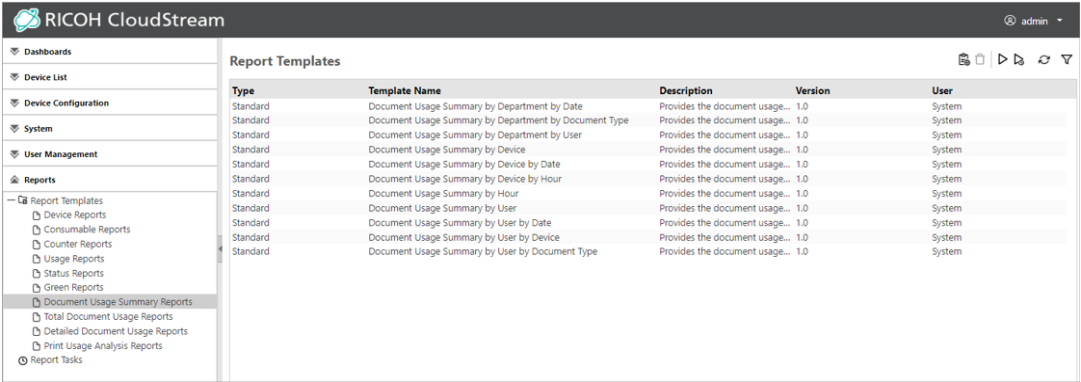
Document Usage Summary Reports
Use a report template in the Document Usage Summary Reports category to create a summary report of the total document usage (number of printed or sent pages) for a device based on various criteria.
 To create reports in this category, the RICOH CloudStream Print&Scan license is required in addition to the Device Management license.
|
Document Usage Summary Report Templates |
Description |
|---|---|
|
Document Usage Summary by Department by Date |
Use this report to view the document usage for the selected departments over a fixed period (year, month, and day). Dates with no output are not shown.
|
|
Document Usage Summary by Department by Document Type |
Use this report to view the document usage by job type (print, copy, scan, etc.) for the selected departments. Job types with no output are not shown. |
|
Document Usage Summary by Department by User |
Use this report to view the document usage by user in the selected departments. Users with no output are not shown. |
|
Document Usage Summary by Device |
Use this report to view the document usage for the selected devices. Devices with no output are not shown. The cost ratio is indicated in a graph, and device names, number of pages, and cost are indicated in a table.
|
|
Document Usage Summary by Device by Date |
Use this report to view the document usage for the selected devices over a fixed period (year, month, and day). Dates with no output are not shown. |
|
Document Usage Summary by Device by Hour |
Use this report to view the document usage over 24 hours for the selected devices. Hours with no output are not shown. |
|
Document Usage Summary by Hour |
Use this report to view the total document usage for the selected hours. Hours with no output are not shown. |
|
Document Usage Summary by User |
Use this report to view the document usage for the selected users. Users with no output are not shown. The cost ratio is indicated in a graph, and user IDs, number of pages, and cost are indicated in a table.
|
|
Document Usage Summary by User by Date |
Use this report to view the document usage for the selected users over a fixed period (year, month, and day). Dates with no output are not shown. |
|
Document Usage Summary by User by Device |
Use this report to view the document usage by device for the selected users. Devices with no output are not shown. |
|
Document Usage Summary by User by Document Type |
Use this report to view the document usage by job type (print, copy, scan, etc.) for the selected users. Document types not output are not shown. |
When a department has a hierarchical structure, the document usage summary by department is calculated as a sum of usage of lower levels.
For example: When Department C exists under Department B under Department A and their usage is c, b, a respectively:
-
Document usage of Department A is a+b+c
-
Document usage of Department B is b+c
-
Document usage of Department C is c
Document Usage Summary Reports are displayed like the image below: